

GLX Secure Contact: Building and Debugging a Custom WordPress Contact System
Overview
Rather than relying on prebuilt solutions like Contact Form 7 or WPForms, I developed a custom WordPress plugin to handle contact form submissions.
This was an intentional design decision: to create a lightweight, self-contained system with full control over behavior, security, and data flow.
While established plugins offer convenience and rapid setup, they often introduce tradeoffs in the form of additional overhead, limited flexibility, and dependency on external update cycles. Customizing their behavior beyond intended use cases can require significant workarounds or paid extensions, especially when integrating bespoke validation or security logic.
In this case, building a focused solution from the ground up allowed for tighter control over the request lifecycle, clearer visibility into system behavior, and a reduced surface area for both performance and security concerns.
A contact system is only useful if messages reliably arrive. Part of this project involved diagnosing real-world delivery and authentication issues rather than treating the form as a purely visual feature.
Given sufficient experience with PHP and WordPress internals, a custom implementation can also be a cost-effective option—eliminating recurring plugin licensing costs while producing a solution tailored precisely to the application’s needs.
The Goal
Design a contact system that is:
- Lightweight and dependency-free
- Resistant to spam and abuse
- Fully transparent in behavior
- Compatible with modern email delivery systems
The aim wasn’t just functionality—it was reliability under real-world conditions.
System Design
The plugin operates as a layered system:
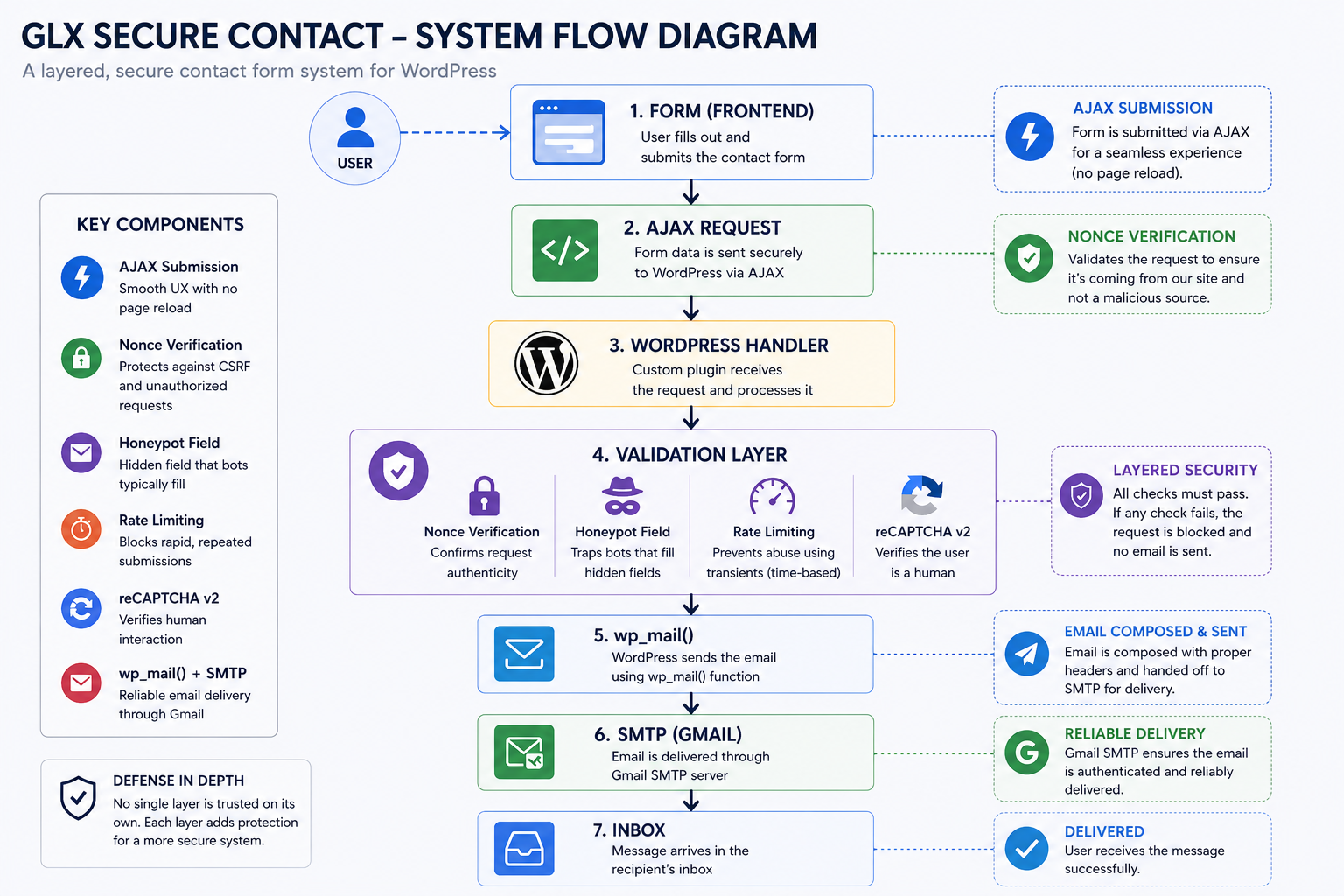
System flow diagram illustrating the layered validation and delivery pipeline
User → Form → AJAX → WordPress Handler
         ↓
    Validation Layer
    - Nonce verification
    - Honeypot field
    - Rate limiting (transients)
    - reCAPTCHA v2
         ↓
     wp_mail → SMTP → Gmail
Key Components
- AJAX submission for seamless UX with no page reload
- WordPress nonce verification for request authenticity
- Honeypot field to trap bots
- Rate limiting using WordPress transients
- Google reCAPTCHA v2 integration
- SMTP delivery via
wp_mail()and Gmail
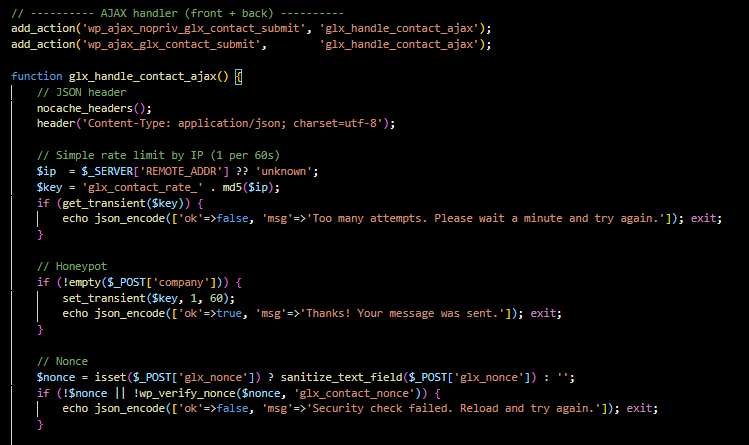
Custom AJAX request handling: The form routes requests through WordPress AJAX hooks while applying layered protections including rate limiting, honeypot spam filtering, and nonce verification.
This structure reflects a layered security model: no single mechanism is trusted on its own.
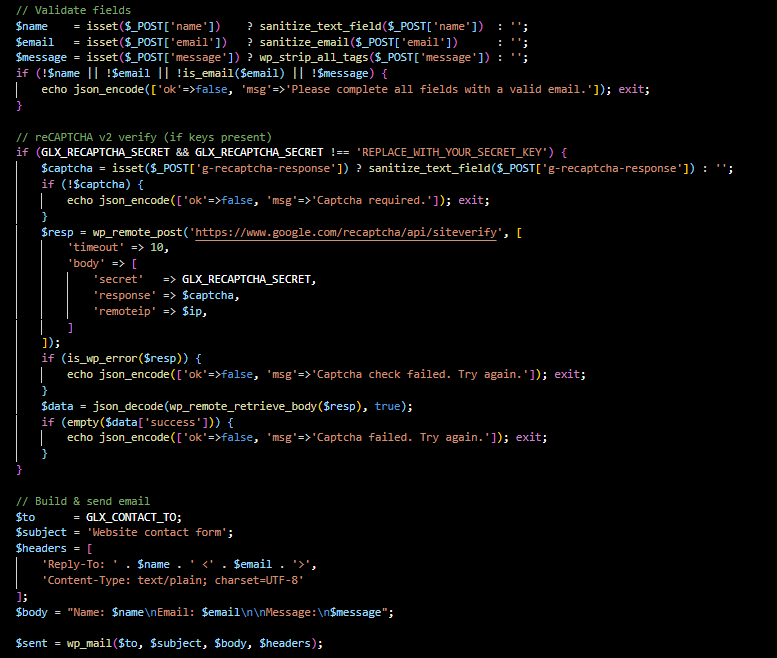
Validation and delivery workflow: User input is sanitized and validated before optional reCAPTCHA verification and structured email delivery through WordPress mail handling.
The Problem
The system initially worked as expected—but later developed a subtle failure:
- Users received a success message
- Emails were never delivered
- SMTP tests passed independently
The system appeared to succeed while doing nothing.

Silent failure: validation triggered spam logic while still returning a success response
Investigation
Rather than assuming a single point of failure, I approached this as a multi-layer system diagnosis:
- Verified SMTP delivery independently
- Confirmed
wp_mail()functionality - Compared execution paths between test and live form
- Examined validation conditions and branching logic
This revealed a mismatch between user feedback and actual execution flow.
Root Cause
The issue stemmed from an interaction between security design and browser behavior:
The honeypot field
companywas being auto-filled by browser autofill, triggering spam detection logic.
Because the system treated this as spam:
- The email send function was skipped
- A success message was still returned
This created a silent failure condition—one of the most dangerous classes of bugs.
The Fix
Several improvements were implemented:
- Renamed the honeypot field to avoid autofill triggers
- Disabled autocomplete behavior for that field
- Differentiated responses during debugging: success vs. spam
- Verified the correct execution path after the fix
Additional refinements included:
- Improved email headers, including proper
FromandReply-Tobehavior for SMTP compliance - Added better visibility for debugging and logging
Outcome
- Fully functional, reliable contact system
- Successful email delivery through Gmail SMTP
- Spam protections preserved and improved
- Greater transparency in system behavior
Key Takeaways
A few lessons emerged from this project:
Security mechanisms can introduce subtle failure modes when they intersect with modern browser behavior.
Systems that fail silently are often more dangerous than those that fail visibly.
A system can appear to work perfectly while doing nothing at all.
Why This Project Matters
This project demonstrates:
- Building custom tools instead of relying entirely on prebuilt plugins
- Understanding WordPress internals, including AJAX, hooks, and transients
- Working with real-world email systems and SMTP delivery
- Debugging across multiple layers of a system
- Balancing security with usability
It’s not just a contact form—it’s an example of end-to-end system ownership.
Code Insight
if (!empty($_POST['glx_hp_field'])) {
    // Spam detected
}
Even something this simple becomes complex in practice:
- Field naming matters
- Browser behavior matters
- Assumptions about “invisible fields” can break
Strategic Fit
This project fits into a broader portfolio pattern:
- Network audit and infrastructure validation: systems thinking and infrastructure
- GLX Secure Contact: software development, debugging, and security
This contact system was developed and tested as part of the broader GreatLynx Designs WordPress portfolio platform , where it operates in a live production environment.

Need help debugging or building a reliable system?
I work with clients on WordPress development, system debugging, and infrastructure—especially in cases where things are working on the surface but failing underneath.
If you’re working with a live system and need a clear understanding of how it behaves before making changes, feel free to reach out.